How to Set Availability Rules for Travel Leads

Few things frustrate travelers—and agents—more than this scenario:
A new inquiry comes in. It gets assigned immediately. The traveler waits patiently… and hears nothing back. Why? The agent is on vacation, at a conference, or already overloaded.
By the time the mistake is noticed, the lead is cold.
Across sales-driven teams, studies show that 15–30% of follow-up attempts are wasted due to poor timing or misrouted assignments. In travel agencies, where response speed and trust are everything, assigning leads to unavailable agents quietly kills conversions.
That’s why setting clear availability rules for travel leads is one of the most impactful (and overlooked) improvements an agency can make.
In this guide, you’ll learn why manual availability tracking fails, how to automate availability rules, and how smart routing ensures every lead reaches someone ready to respond.
The Problem with Manual Availability Tracking
Most agencies try to track availability. The problem is how they do it.
Why manual systems break down
Common approaches include:
- Shared calendars
- Slack status messages
- Verbal “I’ll be out next week”
- Spreadsheet schedules
These methods rely on memory and constant updates—which rarely happen consistently.
Availability changes faster than systems
Even the best calendar doesn’t capture:
- Sick days
- Overflow workloads
- Unexpected meetings
- Mental capacity limits
As a result, leads still get routed to agents who technically exist—but aren’t practically available.
The hidden cost of bad assignments
When leads go to unavailable agents:
- Follow-ups are delayed
- Managers reassign manually
- Travelers lose confidence
- Agents feel guilty or overwhelmed
This creates friction on both sides of the relationship.
Manual tracking isn’t just inefficient—it actively undermines smart lead assignment travel workflows.
Step-by-Step Guide to Automated Availability Rules
The goal of availability rules is simple: only available agents receive new leads.
Automation makes this reliable.
Step 1: Define what “available” means
Availability isn’t binary. Start by defining criteria such as:
- Actively working today
- Not on vacation
- Under daily/weekly lead caps
- Marked available by the agent
Document this clearly and share it with the team.
Step 2: Centralize lead intake
Availability rules only work if leads enter one system.
Route all inquiries from:
- Website forms
- Social messages
- Referrals
into a single intake flow. This creates the foundation for automated lead routing travel workflows.
Step 3: Give agents an availability toggle
Agents should control their own status with a simple toggle:
- Available
- Busy
- Out of office
This removes guesswork and empowers agents to manage capacity honestly.
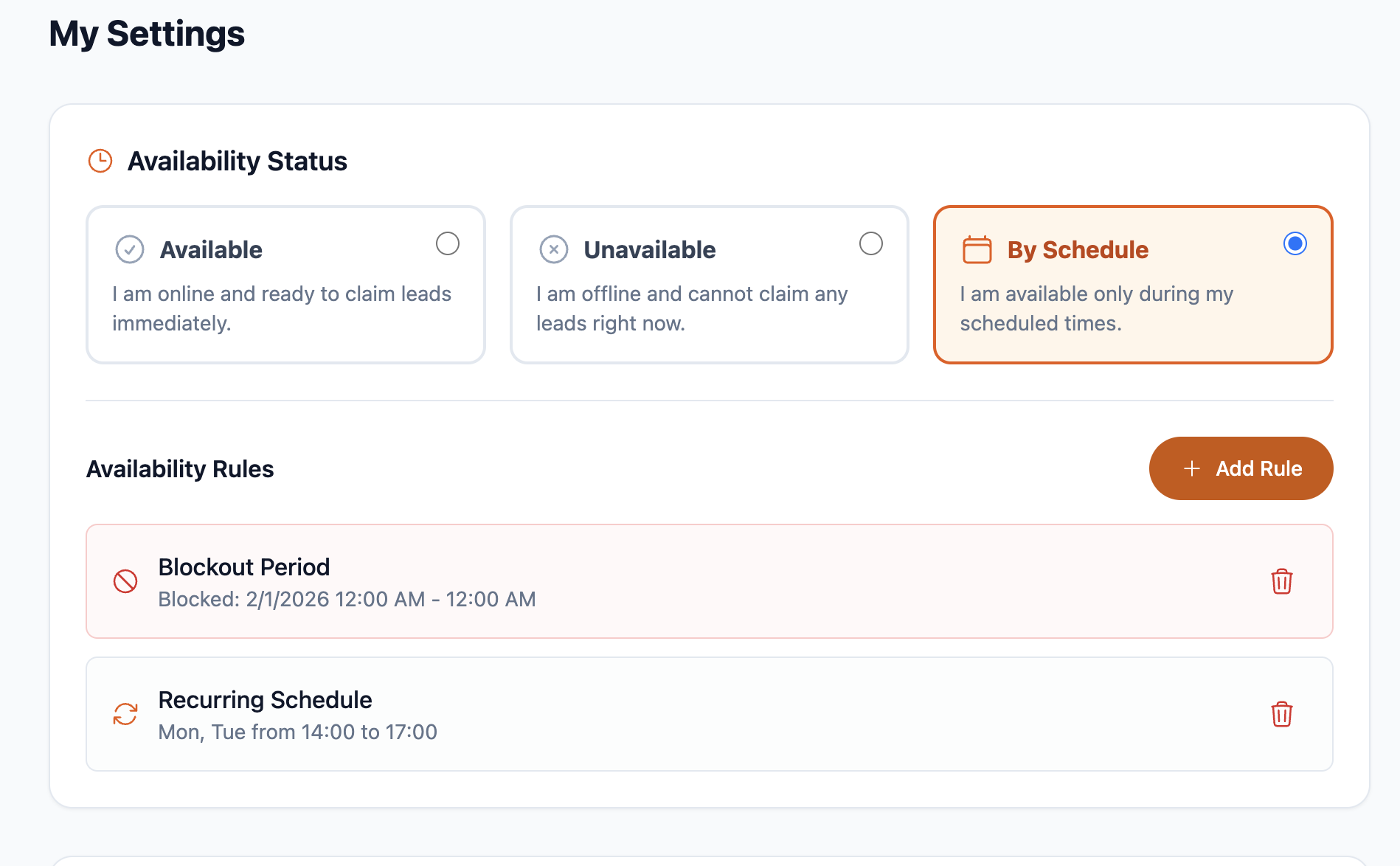
Step 4: Add vacation and schedule rules
Beyond manual toggles, automation should support:
- Vacation date ranges
- Recurring schedules (e.g., Mon–Thu only)
- Time-zone awareness
This ensures leads aren’t assigned when agents are predictably unavailable.
Step 5: Combine availability with assignment logic
Availability works best when paired with:
- Lead caps
- Skill-based routing
- Fair distribution rules
For example:
“Assign leads only to agents marked available and under their daily cap.”
You can link internally to related frameworks like fair lead assignment strategies or shared lead boards.
Best Tools and Features for Availability Rules
Availability rules require more than a checkbox. Look for tools designed around real workflows.
One-click availability toggles
Agents need a fast, visible way to change status.
The best tools show:
- Current availability
- Reason (busy, vacation, capped)
- When status will change back
This supports healthier boundaries.
Recurring schedules
Not every agent works the same hours.
Recurring rules allow:
- Part-time schedules
- Time-zone differences
- Predictable availability windows
This is critical for distributed teams.
Vacation scheduling
Vacation scheduling should:
- Automatically block assignments
- Resume routing when the trip ends
- Require no manual intervention
This prevents “oops” moments.
Smart auto-assignment
Availability rules shine when paired with automation.
Smart systems route leads:
- Only to available agents
- In real time
- Without manager involvement
Tools like Travilead combine availability, caps, and assignment logic into one flow.
Reporting and visibility
Managers should see:
- Who is unavailable
- Why leads weren’t assigned
- Where capacity gaps exist
This turns availability into a planning tool, not just a gatekeeper.
Explore more workflow guides at /blog and /guides.
Case Study: Tour Operator Eliminates Bad Assignments
Before: constant reassignment
A regional tour operator with 12 sales agents handled leads via:
- Shared inbox
- Manager assignment
Problems included:
- Leads assigned to agents on vacation
- Manual reassignments multiple times per day
- Frustrated travelers waiting for replies
- Agents feeling blamed for delays
The new system
They implemented availability rules for travel leads with:
- Agent-controlled availability toggles
- Vacation date scheduling
- Auto-assignment only to available agents
- Real-time visibility for managers
Results after 45 days
| Metric | Before | After |
|---|---|---|
| Misassigned leads | Frequent | Near zero |
| Avg response time | 8–12 hrs | < 2 hrs |
| Manual reassignments | Daily | Rare |
| Agent satisfaction | Mixed | High |
The biggest change wasn’t speed—it was confidence. Everyone trusted the system.
FAQs About Availability Rules for Travel Leads
1. Should agents control their own availability?
Yes. Self-managed availability encourages honesty and prevents burnout. Managers retain override control when needed.
2. How do availability rules work with lead caps?
They work together. An agent may be “available” but temporarily blocked once they hit their cap.
3. Can managers override availability?
Good systems allow manager overrides for:
- VIP clients
- Emergencies
- Training scenarios
Overrides should be visible and logged.
4. What about part-time or seasonal agents?
Availability rules are ideal for them. Recurring schedules ensure leads only route during working hours.
5. How do we report on availability impact?
Track metrics like:
- Response time by availability
- Leads delayed due to no available agents
- Capacity gaps by day or week
This data informs staffing decisions.
Conclusion: Right Lead, Right Agent, Right Time
Leads don’t fail because agents don’t care—they fail because systems don’t respect reality.
By setting clear availability rules for travel leads, you:
- Prevent wasted follow-ups
- Protect agent boundaries
- Improve response times
- Build trust with travelers
If your agency still relies on memory, calendars, or manual checks, it’s time for smarter routing.
👉 Try Travilead to automate availability rules, schedules, and smart lead assignment.
The Team plan starts at $39/month and gives you the control needed to route leads only to agents who are truly available.
Visit https://travilead.com to create a lead routing system that actually reflects how your team works.
Related Posts
View all posts
Lead Routing Rules for Travel Agencies
Learn how to create lead routing rules for travel agencies so every inquiry goes to the right advisor based on destination, budget, and expertise.

How to Design a Travel Team Pipeline From New to Booked
Learn how to design a travel team pipeline from new to booked that gives agents clarity, improves follow-up, and increases bookings.

How to Prevent Lead Cherry-Picking in Travel Agencies
Learn how to prevent lead cherry picking in agencies with fair rules, shared lead boards, and caps that protect morale, revenue, and client experience.