How to Use a Shared Lead Board for Travel Agents

If you’ve ever discovered a promising travel inquiry days after it arrived, you’re not alone.
Most travel agencies lose leads not because of poor service—but because inquiries are scattered across inboxes, DMs, and contact forms. One agent thinks someone else replied. Another never saw the message at all. By the time the lead is found, the traveler has already booked online.
Industry benchmarks show that 20–40% of inbound travel inquiries never receive a timely response, and response delays over 24 hours can cut conversion rates in half. For agencies built on trust and personalization, that’s an expensive leak.
This is exactly where a shared lead board for travel agents changes everything.
In this guide, you’ll learn what a shared lead board is, why email-based systems fail, and how to implement a simple visual workflow that helps you respond faster, stay organized, and handle more inquiries—without adding stress.
The Problem with Siloed Email Lead Management
Email feels convenient, but it was never designed for collaborative lead handling.
Why inboxes cause leads to disappear
When leads live in personal or shared inboxes:
- Ownership is unclear
- Messages get buried under follow-ups and supplier emails
- Multiple agents assume “someone else replied”
- There’s no easy way to see lead status
Even with labels or folders, email lacks real-time visibility.
Shared inboxes still fall short
Some agencies use a shared inbox hoping it will solve the problem. It helps—but only a little.
Common issues remain:
- No clear “unassigned” state
- No pipeline visibility
- No accountability for follow-up
- No easy reporting
In short, email is passive. Modern sales workflows need to be active and visual.
Step-by-Step Guide to Shared Lead Board Implementation
A shared lead board doesn’t require a massive system overhaul. The goal is simple: every lead is visible, assigned, and tracked.
Step 1: Centralize all incoming inquiries
Start by routing every inquiry into one system:
- Website quote forms
- Email inquiries
- Facebook and Instagram messages
- Supplier or referral leads
This creates a single intake point for all unassigned travel inquiries.
Tip: Centralization alone can dramatically reduce missed leads.
Step 2: Create an unassigned queue
The heart of a shared lead board is the unassigned column.
Every new lead should:
- Appear immediately
- Be visible to the whole team
- Show basic trip details (dates, destination, budget)
This queue answers one critical question instantly:
“Do we have new leads waiting?”
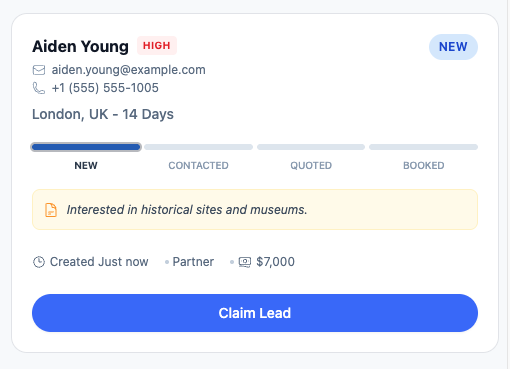
Step 3: Define how leads get claimed or assigned
Next, decide how leads move out of unassigned:
- Manual claiming by available agents
- Automatic assignment rules
- Manager assignment for high-value trips
The key is clarity. Everyone should know how and when leads are taken.
You can link internally to related workflows like lead distribution best practices or fair assignment rules.
Step 4: Build a simple visual pipeline
Once assigned, leads should move through a visual pipeline travel agency teams can understand at a glance.
Typical stages include:
- New
- Contacted
- Quote Sent
- Follow-Up
- Booked
- Lost
A visual pipeline turns lead management into a shared, transparent process instead of a guessing game.
Step 5: Use real-time updates
Real-time updates are what make a shared board powerful.
Everyone can see:
- When a lead is claimed
- When it’s contacted
- When it moves stages
This eliminates duplicate outreach and awkward internal conversations.
Best Tools and Features to Look For
Not all tools labeled “CRM” work well for travel agencies. When evaluating a travel lead board, focus on usability and visibility.
Visual, kanban-style boards
Visual boards make work tangible.
Benefits include:
- Faster prioritization
- Less mental load
- Instant understanding of lead status
Drag-and-drop simplicity matters.
Clear unassigned queues
The unassigned column is non-negotiable.
It ensures:
- No lead is forgotten
- New inquiries are immediately visible
- Accountability is shared
Real-time collaboration
Good tools update instantly across devices, so:
- Agents don’t double-contact
- Managers see progress without micromanaging
- Remote teams stay aligned
Mobile access for on-the-go agents
Travel advisors aren’t always at a desk.
Mobile-friendly access allows agents to:
- Claim leads quickly
- Respond while traveling
- Keep pipelines moving
Built for travel workflows
Generic tools often feel bloated.
Tools like Travilead focus on:
- Shared boards
- Simple pipelines
- Travel-first lead handling
You can explore more comparisons and workflows in our internal resources at /blog and /guides.
Case Study: Solo Advisor Team Handles 2× Inquiries
Before: scattered systems
A small agency with one primary advisor and one assistant handled leads through:
- Personal email
- Website contact forms
- Occasional Facebook messages
Problems included:
- Missed inquiries during busy weeks
- No clear handoff between advisor and assistant
- Constant manual checking of inboxes
After: a shared lead board
They implemented a shared lead board with:
- One unassigned column
- A simple 5-stage pipeline
- Mobile access for quick responses
Results after 60 days
| Metric | Before | After |
|---|---|---|
| Avg response time | 24+ hrs | < 2 hrs |
| Inquiries handled | Baseline | 2× increase |
| Missed leads | Frequent | Near zero |
| Stress level | High | Manageable |
The advisor didn’t work more hours—they just stopped losing leads.
FAQs About Shared Lead Boards for Travel Agents
1. Who can see leads on a shared board?
Visibility depends on permissions. Most teams allow all agents to see unassigned leads, while assigned leads are visible for transparency and reporting.
2. Will agents step on each other’s toes?
No—real-time updates prevent overlap. Once a lead is claimed or assigned, everyone sees it immediately.
3. Can I use a shared board as a solo advisor?
Absolutely. Solo advisors benefit from:
- Better organization
- Clear follow-up tracking
- Reduced mental clutter
4. Does it integrate with forms and email?
Most modern tools integrate with:
- Website forms
- Email forwarding
- Manual entry for social leads
Always confirm integrations before choosing a tool.
5. Is setup complicated?
No. Most shared lead boards can be:
- Set up in under 30 minutes
- Used immediately
- Refined over time
Start simple and evolve.
Conclusion: One Board, Total Clarity
A shared lead board isn’t about adding software—it’s about eliminating chaos.
When all inquiries live in one visible place:
- No lead is forgotten
- Response times improve
- Teams collaborate naturally
- Advisors handle more inquiries with less stress
If your agency still manages leads across inboxes and spreadsheets, it’s time for a simpler system.
👉 Try Travilead and get a shared lead board built specifically for travel agents.
The Starter plan is just $15/month, making it easy to centralize leads, track progress, and stop losing inquiries you already earned.
Visit https://travilead.com to get started today.
Related Posts
View all posts
How to Design a Travel Team Pipeline From New to Booked
Learn how to design a travel team pipeline from new to booked that gives agents clarity, improves follow-up, and increases bookings.

Best Way to Track Unassigned Travel Inquiries
Discover the best way to track unassigned travel inquiries, stop revenue leaks, and ensure every lead is seen, claimed, and followed up fast.

How to Use Travel Lead Distribution Software
Learn how travel lead distribution software helps agencies stop losing leads, assign fairly, and increase bookings with shared boards and pipelines.